
J-Link OB
The On-Board Debug Probe
On-board J-Link debug probe integrated directly on evaluation boards
Provides debugging, flash programming, and VCOM without additional hardware
Compatible with standard J-Link tools and major IDEs for out-of-the-box debugging
1. Built-In Virtual COM Port
2. Drag & Drop Programming
3. WebUSB Programming
4. More Optional Features
5. Use Cases
6. Model Overview
7. Starter Kits
8. Licensing

Overview
The J-Link OB (stands for: on-board) is essentially a microcontroller-based, single-chip J-Link that goes right on the evaluation board. It is compatible with and has the same features as the J-Link BASE with reduced, but still great, performance. It adds features such as debug support and download into Flash memory, without adding significant extra cost.
Customers can fully use, test, and debug the target device (typically a microcontroller) right out of the box. J-Link OB is compatible with most IDEs including Eclipse, GDB-based IDEs, and SEGGER Embedded Studio.
The microcontroller that is used as a J-Link OB (on the left side of the evaluation board in the diagram below) has a USB-interface on its left side (facing the host) and a JTAG/SWD + SWO interface on its right side (facing the target device).

Connecting the PC and the target CPU
using a regular J-Link.

Connecting the PC and the target CPU
using a J-Link OB.
Key features
- Same features as J-Link BASE
- Compatible with most IDEs
- JTAG, SWD and SWO supported
- "Drag-and-Drop" interface for intuitive programming of the target device (optional)
- Virtual COM Port (optional)
- Very small form factor
- Allows use of external debug probes
Built-In Virtual COM Port
J-Link OB comes with built-in virtual COM port (VCOM) functionality. This means that in addition to the regular J-Link debug functionality, J-Link will also show up as a COM port in the device manager of the operating system.
Most modern computers don't have a physical COM port anymore. However, many hardware setups still use UARTs for logging, diagnostics and application control. That's why a separate COM to USB adapter is needed to get full COM functionality of the target hardware, while debugging at the same time. With J-Link, there's no need for an additional adapter since J-Link already provides this adaption functionality.
J-Link VCOM functionality is implemented via SEGGER emUSB-Device, using the CDC-ACM class. J-Link models are shipped with VCOM functionality disabled. It can be enabled via the J-Link Configurator utility.
Drag & Drop Programming
Drag-And-Drop is an optional J-Link OB intuitive programming feature. It allows programming of your target MCU in a very simple way. J-Link OB with Drag-And-Drop capability appears both as a debug probe and as a flash drive on the user's computer.
The high performance and functionality of flash download using a debugger and a J-Link still exists and is as straightforward as ever.
Drag and drop just makes it faster and even easier! With the flash drive option it is now as simple as dragging and dropping a file (a Motorola S-record, an Intel Hex, or a plain binary) onto the J-Link drive. There is no need to install application software. Anyone that can drag and drop a file to a USB memory stick can now program the target on an evaluation board.
This J-Link Drive enables manufacturers, and third-party software developers, to deploy ready-to-go demonstration applications to customers who can then quickly evaluate the capability of the board, software, and device - all without installing software or drivers. All major operating systems (Windows, macOS, Linux) are supported.
Developed by SEGGER's Embedded Experts Team, J-Link OB offers a compelling opportunity for board manufacturers to provide a highly polished way to deliver integrated solutions to customers, and enhance the experience over time by adding new applications and features that just "drop into place".
Once customers are ready to do more than download fixed demonstration applications, they can unleash the full potential of the target board using the J-Link OB as a debug probe backed by unparalleled, industry-wide support. This feature uses SEGGER's Virtual MSD technology.
Please Note: The Drag & Drop Programming option is available upon request only.
Example Implementation
The image below demonstrates how easily the microcontroller on the SEGGER emPower (V2 Rev. D or later) can be programmed via the "Drag-And-Drop" option.
- Connect the J-Link OB to a Windows, Mac or Linux machine via USB and open the file explorer of your choice. J-Link will be shown as a flash drive.
- Drag and drop one of the demo .hex files to the J-Link drive. Programming will start as soon as you drop the file.
- Relax and watch the demo which starts automatically after a few seconds, once programming is complete!
The following boards are already using J-Link OB implementations that support Drag and Drop Programming:
- NordicSemi nRF52-DK
- SEGGER emPower (V2 Rev. D or later)
WebUSB Programming
WebUSB is an optional J-Link OB feature. It allows programming of the target MCU in a very easy way, using the web browser.
The high performance and functionality of flash download using a debugger and a J-Link still exists and is as straightforward as ever.
J-Link OB with WebUSB capability can also be accessed on the user's computer via a web browser:
- Go to this page: https://www.segger.com/jlink_webusb_update_target_firmware.html
- Select the application image to be programmed (Motorola S-record, an Intel Hex, or a plain binary)
- Connect to J-Link OB in the web browser:

- Wait until programming is complete:
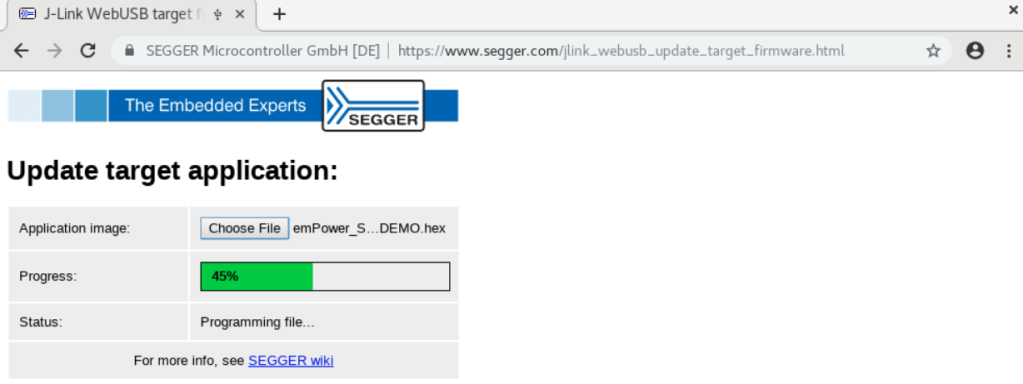
There is no need to install application software. Anyone that can use a browser can now program the target on an evaluation board.
Note: J-Link OB uses the WebUSB component SEGGER's emUSB-Device.
More Optional Features
Hardware Flow Control
Hardware Flow Control feature is an optional add-on that allows the J-Link OB to maintain a reliable data transmission via the Virtual COM port (VCOM) using the RTS/CTS lines.
Please Note: The Hardware Flow Control option is available upon request only.
PLUS Option
A standard J-Link OB comes with the same options as J-Link BASE.
It does not allow the usage of unlimited breakpoints in flash memory, or the use of software packages such Ozone and J-Flash.
With the PLUS option, all of these software packages are also available to the end user of the J-Link OB.
Use Cases
Out of the box test environments - evaluation boards
Silicon vendors and software vendors in the embedded market, a test platform for their customers is an important tool within the trial process before the purchase. To provide customers an out-of-the-box hassle-free experience, integrating a debug probe on the evaluation board reduces the requirements on customer side to actually perform their trials.
In-Field Support Interface
Embedded devices that require service in difficult to access locations might benefit from a reduced set of tools to be inserted. Having to wield debug system and probe might prove impossible in such situations. Adding the debug interface to the product would reduce the mechanical effort to service the device to a single USB cable.
Test equipment in production environments
Quality verifications in production might require interfaces that include a control interface similar to the debug interface used in development to introduce signals or inject test firmware images. Such applications might not work with a debug probe alone. To reduce the number of tools, integrating a debug probe in the tool can significantly reduce the size of such test equipment.
Model Overview
J-Link OB is essentially a microcontroller with a USB device interface running J-Link firmware. Below is a list of currently available options for J-Link-OB, along with the supported cores and interfaces.
Please note that not every J-Link-OB supports every core and every interface/feature. Other microcontrollers can be supported upon request.
| J-Link OB model | OB Device | Supported target cores | JTAG | SWD | VCOM support | Drag & Drop support1 | SWO speed | Interface speed | Download performance |
| J-Link-OB-K22-Cortex-M | NXP MK22FN128VLH10 LQFP64 package No external crystal required Cortex-M4 @ 96MHz, 128 KB flash | Cortex-M | Supported | Supported | Supported | Supported | 4 MHz | 4 MHz | 200 KB/s |
| J-Link-OB-K22-Cortex-A | Cortex-A | Supported | Supported | Supported | Not Supported | 4 MHz | 4 MHz | 200 KB/s | |
| J-Link-OB-K22-RISCV | RISC-V (RV32, RV64) | Supported | Supported | Supported | Supported | 4 MHz | 4 MHz | 200 KB/s | |
| J-Link-OB-K22-Full | Cortex-M Cortex-A/R (ARMv7-A/R) Cortex-A/R (ARMv8-A/R) RISC-V (RV32, RV64) | Supported | Supported | Supported | Supported | 4 MHz | 4 MHz | 200 KB/s | |
| J-Link-OB-RA4M2-Cortex-M | Renesas R7FA4M2AB3CNE QFN48 package Cortex-M33 @ 96 MHz, 256 KB flash | Cortex-M | Supported | Supported | Supported | Supported | 4 MHz | 4 MHz | 200 KB/s |
| J-Link-OB-RA4M2-RISCV | RISC-V (RV32, RV64) | Supported | Supported | Supported | Supported | 4 MHz | 4 MHz | 200 KB/s | |
| J-Link-OB-RA4M2-Full | Cortex-A Cortex-M Cortex-R RISC-V (RV32, RV64) | Supported | Supported | Supported | Supported | 4 MHz | 4 MHz | 200 KB/s | |
| J-Link-OB-STM32F072-Cortex-M-128KB | ST STM32F072CB UFQFPN48 package No external crystal required Cortex-M0+ @48 MHz, 128 KB flash | Cortex-M | Not Supported | Supported | Supported | Supported | 250 kHz | 2 MHz | 100 KB/s |
| J-Link-OB-STM32F072-Cortex-M-64KB | ST STM32F072C8 UFQFPN48 package No external crystal required Cortex-M0+ @48 MHz, 64 KB flash | Cortex-M | Not Supported | Supported | Supported | Not Supported | 250 kHz | 2 MHz | 100 KB/s |
| J-Link-OB-STM32F072-Cortex-A-64KB | Cortex-A | Supported | Supported | Supported | Not Supported | 250 kHz | 2 MHz | 100 KB/s | |
| J-Link-OB-STM32F103-Cortex-M | ST STM32F103TB VFQFPN36 package Cortex-M3 @72 MHz, 128 KB flash | Cortex-M | Supported | Supported | Not Supported | Not Supported | 4.5 MHz | 2.25 MHz | |
| J-Link-OB-STM32F103-Cortex-A | Cortex-A | Supported | Supported | Not Supported | Not Supported | 4.5 MHz | 2.25 MHz | 150 KB/s | |
| Available, but not recommended for new designs | |||||||||
| J-Link-OB-SAM3U128 | Atmel ATSAM3U2C LQFP100 package Hi-Speed USB Cortex-M3 @96 MHz, 128 KB flash | Cortex-A Cortex-M Cortex-R | Supported | Supported | Supported | Supported | 12.0 MHz | 3.2 MHz | 225 KB/s |
| J-Link-OB-SAM7S64 | Atmel SAM7S64 LQFP64 package ARM7 @48 MHz, 64 KB flash | ARM7 ARM9 Cortex-A Cortex-M Cortex-R | Supported | Supported | Not Supported | Not Supported | 6.0 MHz | 12 MHz | 700 KB/s |
1 Optional. Needs to be specified when ordering
Starter Kits
J-Link OB Starter Kits allow board developers to test the suitability of J-Link OBs on their specific target board. There are different licensing options available for evaluation board and commercial use.
Package Content
Every Starter Kit Contains:
- 5 OB licenses for initial evaluation purpose only
- J-Link BASE Classic
- 6-pin Needle Adapter
- Documentation which includes schematic for selected J-Link OB host
- J-Link OB reference board (subject to availability)
- J-Link OB programming utility for testing and production purposes
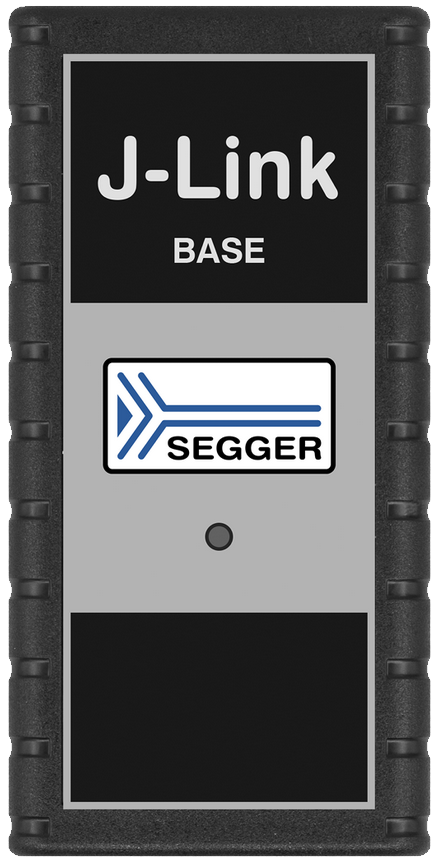

J-Link BASE Classic
J-Link 10-pin Needle Adapter
Licensing
Originally the J-Link OB was intended to be licensed by evaluation board manufacturers and silicon vendors at very reasonable prices. Later, requests came from companies for in-house use, and for use in developing products whereby the J-Link OB stays with the product after development. That's why SEGGER made the J-Link OB available for different areas of application.
Evaluation board manufacturers: Under the license for evaluation board manufacturers, the J-Link OB is provided solely as part of an evaluation board. It is not sold separately and may only be used to debug the device on the evaluation board it comes with. In this case, support is provided via the evaluation board manufacturer and via SEGGER Forum. The J-Link OB may not be used for production purposes.
General purpose use & Buy-outs: The J-Link OB can be licensed to be designed in a product or a software development board (for setting up an automated test environment etc.). A Buy-out license is available upon request.
General Purpose Use
J-Link OB Fixed Single Target - Internal Use (FSTI)
Description: J-Link OB debug and program only specified target board for internal user only - commercial use is permitted.
Use example: In-house software development boards or largescale testing.
J-Link OB Fixed Single Target - Shipping Product (FSTP)
Description: J-Link OB resides on its own detachable target board and can be used to program multiple targets (same set as supported by J-Link) for production purposes - commercial use is permitted.
Use example: Production programming/ test setup either internal or at contract manufacturer for multiple products or products lines.
J-Link OB Detachable Multi-Target - Internal Use (MTDI)
Description: J-Link OB resides on its own detachable target board and can be used to program multiple targets (same set as supported by J-Link) for internal use only - commercial use is permitted.
Use example: Internal test board setup for testing multiple products or product lines.
J-Link OB Detachable Multi-Target - Production (MTDP)
Description: J-Link OB resides on its own detachable target board and can be used to program multiple targets (same set as supported by J-Link) for production purposes - commercial use is permitted.
Use example: Production programming/ test setup either internal or at contract manufacturer for multiple products or product lines.