
J-Link SDK
J-Link Software Development Kit (SDK) allows customers to integrate J-Link support into their own applications.
J-Link Software Development Kit (SDK) allows customers to integrate J-Link support into their own applications. This is used in professional IDEs, such as SEGGER's Embedded Studio and others, to allow debugging directly via a J-Link, as well as in customized production utilities.
Typical applications to be used with J-Link are for example:
- Complete debuggers or additional debugger utilities like data visualizers
- Customized flash programming utilities to be used in the production
- Automated test applications
J-Link SDK is available for Windows, Linux and macOS, as 32-bit and 64-bit versions and can be used with nearly every programming language or solution. The integration of J-Link is done via a standard DLL/ share library and provides easy-to-use C-language API functions. The SDK comes with startup projects for C (Visual C++ 6 and Visual Studio 2010), VB6 (Microsoft Visual Basic) and VB.NET (Visual Studio 2010).
The J-Link SDK allows using the entire functionality of J-Link, such as:
- The integrated flash programming capabilities, allowing high-speed flash programming of all supported devices without creating a custom flash-loader
- Complete control of the target (Run, halt, reset, step,...)
- Setting breakpoints and watchpoints, including setting Unlimited Flash Breakpoints
- Using High-Speed Sampling, SEGGER Real Time Transfer (RTT), SWO and Simple Trace directly in the application
- Low-level communication with the target via JTAG commands
Supported CPU Cores
J-Link SDK always supports all cores which are also supported by J-Link. New supported cores can be added by updating the J-Link DLL.
Example Projects
J-Link SDK includes different example applications in source code which demonstrate the usage of the J-Link API, show the basic startup sequence and provide examples how to integrate the J-Link DLL in different programming languages. The example projects are organized by the executing target platform (Windows, Linux, Mac, Target) and the programming language / environment. The following table gives an overview about the include example projects. The usage of the J-Link SDK is not limited to these programming environments, it can be used from nearly every programming language which allows loading shared libraries.
| Project / Script | Target platform | Description |
|---|---|---|
| Samples_Startup_Python.py | Windows/ Linux/ macOS, Python 3.5.2 | Python script showing how to call J-Link DLL functions and demonstrating the startup sequence |
| Windows\C\ Start_JLink_VS2010.sln | Windows, Visual Studio 2010, C code | Visual Studio 2010 solution including example projects for the J-Link DLL startup sequence and flash download via J-Link |
| Windows\C\ Start_JLink_VC6.dsw | Windows, Visual C++ 6.0, C code | Visual C++ 6 workspace, including example projects for the J-Link DLL startup sequence, flash download via J-Link, reading the target's JTAG ID, hardware testing, instruction tracing and the J-Link RTT Logger and J-Link Commander tool |
| Windows\VB.NET\ Start_JLink_VBNET | Windows, VB.NET | Visual Basic .NET Visual Studio 2010 project showing how to call J-Link DLL functions and demonstrating the startup sequence |
| Windows\VB\ Start_JLink_VB60 | Windows, Mircosoft Visual Basic 6.0 | Visual Basic 6.0 project for the J-Link DLL startup sequence and the usage or the J-Link SDK in a VB application |
| Windows\LabView2011\ Startup.lvproj | Windows, LabView 2011 | LabView 2011 project for the J-Link DLL startup sequence and the usage or the J-Link SDK in a LabView application |
| Windows\CSharp\ JLink_Start_CSharp.sln | Windows, Visual Studio 2010 C# | Visual Studio 2010 project for the J-Link DLL startup sequence and the usage or the J-Link SDK in a C# application |
Test Applications
The example projects are configured to be compiled and executed out-of-the-box and included as precompiled executable. They can be used to test the correct installation and proper function of the J-Link.
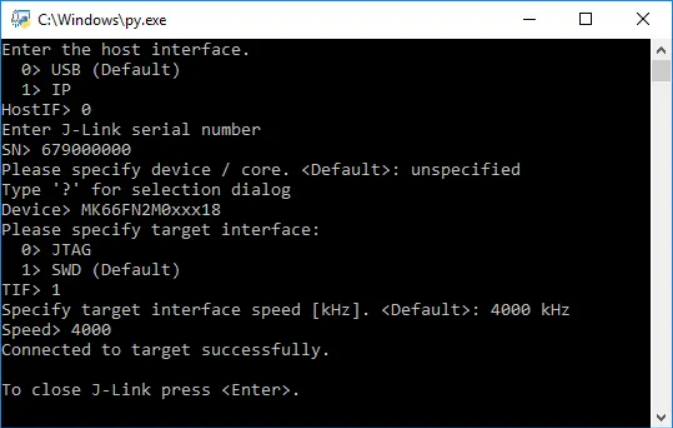
Python Script:
Example Python script can be executed using Python 3.5.2 on Windows, Linux and macOS.
C Code Applications:
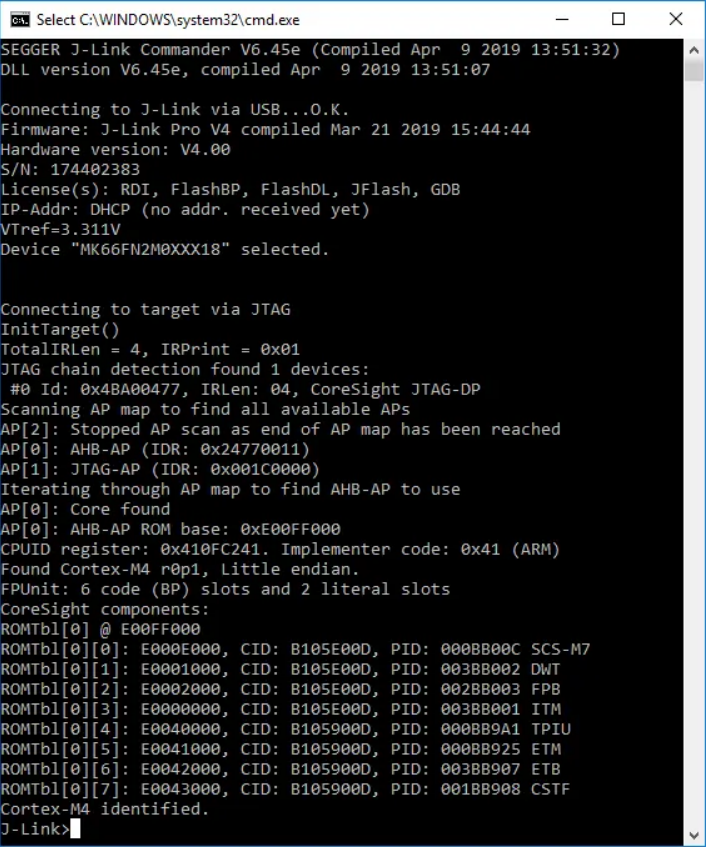
Example C code applications code can be compiled with every common C compiler on Windows, Linux and macOS. Workspace / solutions and project files for Visual C++ 6.0 and Visual Studio 2010 are included as an easy way to start with, but the J-Link SDK is not limited to be used with these IDEs.
Visual Basic & Visual Basic .NET Application:
Example Visual Basic application is written in VB 6 and can be compiled with Microsoft Visual Basic. Example VB.NET application is created with Microsoft Visual Studio 2010.

J-Link SDK Package
J-Link SDK comes with everything which is needed to start implementing J-Link support into software or create a new application using J-Link. It includes the needed libraries for the selected platform, a complete documentation of the available J-Link API and additional background information, the USB drivers for J-Link and example startup projects to show the usage of J-Link. The J-Link SDK includes everything which is needed to integrate J-Link into an application. The table below lists the most important files which are included.
Package Content
J-Link SDK includes everything which is needed to integrate J-Link into an application. The table below lists the most important files which are included.
| File | Content |
|---|---|
| JLinkARMDLL.h | Default J-Link DLL header file. Contains function declarations, defines and typedefs used in the DLL. Must be included to use the DLL functions |
| JLink.h | Fallback J-Link DLL header file. Like JLinkARMDLL.h, but with stdcall function declarations instead of C declaration. Must be used for applications which cannot use C declaration functions |
| JLink.lib | J-Link import library to load the J-Link DLL functions. Searches for J-Link DLL in installed J-Link software if the DLL is not in executable directory |
| JLinkARM.lib | J-Link import library to load the J-Link DLL functions. Searches for J-Link DLL in executable directory only. Should not be used when updating the DLL shall be possible |
| JLinkARM.dll | The J-Link DLL itself to be copied into the application's executable directory |
| UM08002_JLinkDLL.pdf | J-Link SDK documentation |
| Release.html | J-Link SDK release notes |
Licensing
J-Link SDK license allows using custom applications within the customer's company only. Authorization to distribute and ship software which uses the J-Link SDK or parts of it can be permitted by SEGGER upon request.
Requirements
- J-Link SDK
- PC running Windows/ Linux/ macOS
- J-Link
- Compiler or IDE of choice for the desired programming language