
CSS CANsub.4 4 x CAN Bus Interface (USB + Ethernet)
4 x CAN Bus Interface (USB + Ethernet)
This 4 x CAN FD interface lets you stream CAN bus data in real-time via USB/Ethernet - with pro specs, built-in LCD display and zero software installation.
The free CSS webCAN app is hosted offline on the CSS CANsub - simply enter the device URL in a browser to start. This lets you instantly send/receive CAN frames, DBC decode data and plot CAN signals from any connected PC, tablet or phone.
The device supports e.g. python-can, SavvyCAN & PlotJuggler - and the open REST/WebSocket API lets you easily build custom tools incl. pure web apps.
Ideal for CAN bus diagnostics, OEM development, field service, automation, sniffing and dashboards.
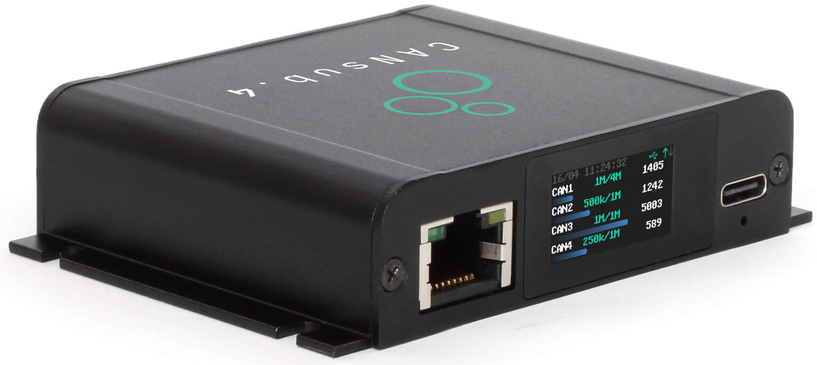


4 x CAN FD interface with USB and Ethernet
Pro specs CAN Bus Interface - at half the cost
CSS CANsub.4 lets you send/receive 4 x CAN FD via USB or Ethernet - with professional-grade specs:
- 4 x CAN (incl. CAN FD) with galvanic isolation
- Stream CAN bus data via either USB or Ethernet
- Built-in LCD display shows device URL and live CAN status
- webCAN app runs on device - zero installation
- 20,000+ frames/second with 1 µs timestamp resolution
- Configurable silent mode and hardware ID filters
- Transmit list 'jobs' with edge-based timing prescision
- CAN error frame and remote frame (RTR) support
- Use standard DB9 adapter cables via DB25-4xDB9 cable
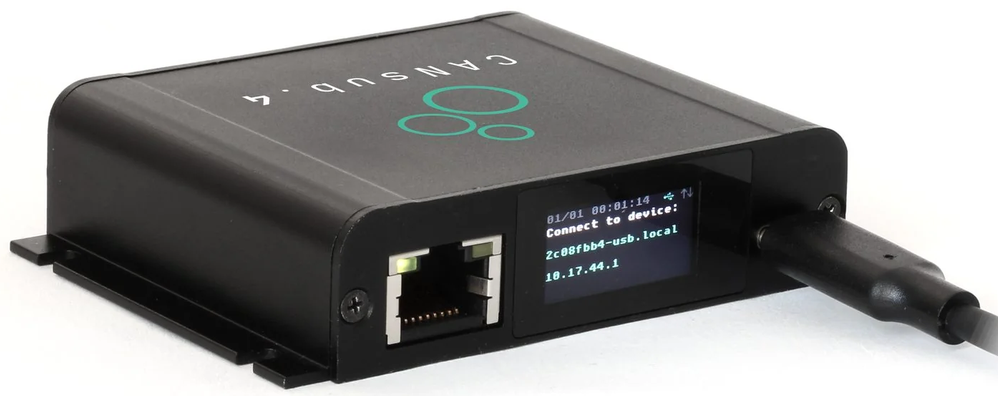
On boot, CSS CANsub.4 display shows the device URL - simply enter it in your browser to open the CSS webCAN app and start streaming CAN data in real-time 
As an alternative to USB, you can connect the CSS CANsub via Ethernet to a router to access it via LAN, WiFi or even the internet (optionally using a Power-Over-Ethernet adapter) 
The optional DB25-4xDB9 adapter cable enables plug and play connection of 4 x isolated CAN buses using CSS standard DB9 adapter cables (e.g. OBD2-DB9, J1939-DB9) 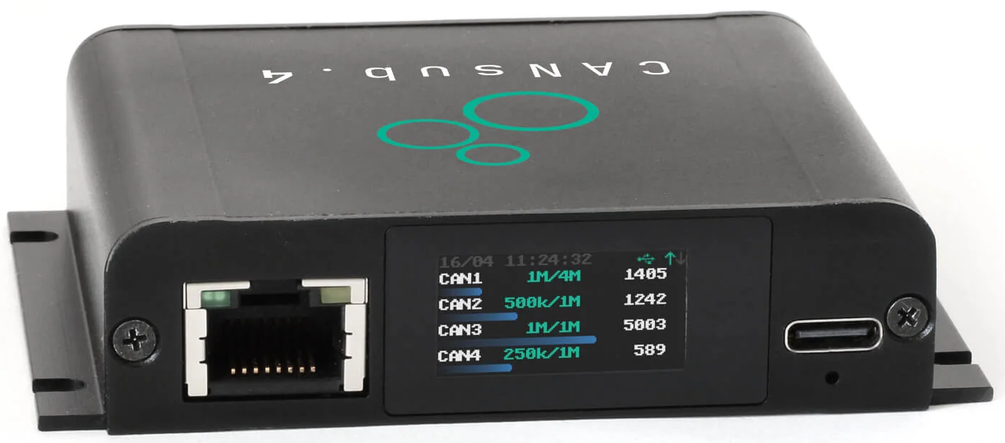
Once connected, the built-in LCD display shows the status of each CAN channel (CAN1-CAN4) incl. bit-rates, busloads, errors and frames/second 
CSS CANsub.4 offers pro specs and 4 x CAN FD channels - yet it is extremely compact, measuring only 8 x 6 x 2 CM and weighting just 90 grams
CSS webCAN runs on your CSS CANsub - Zero installation needed
CSS webCAN app is hosted on the CSS CANsub - simply enter the device URL in your browser to start.
No drivers, no software installation, no internet required:
- Configure bit-rates incl. auto-detection support
- Set hardware filters, silent mode and CAN errors
- Create custom transmit sequences (optional DBC encoder)
- Connect multiple CAN buses in parallel (20K+ frames/sec)
- Load and assign DBC files for real-time decoding
- View summary statistics across CAN IDs and signals
- View, export and import trace data (up to 2M frames)
- Support for J1939 TP, ISO-TP, NMEA 2000 Fast Packets
- Visualize decoded signals in real-time charts
- Powerful frontend filters for CAN IDs and signals
- Save/load device configuration and DBC settings
 CSS webCAN lets you easily plot DBC decoded CAN signals in real-time plots - with seamless historical browsing
 By connecting the CANsub to your WiFi router via Ethernet, any device (incl. tablets/smartphones) can use webCAN instantly from the browser
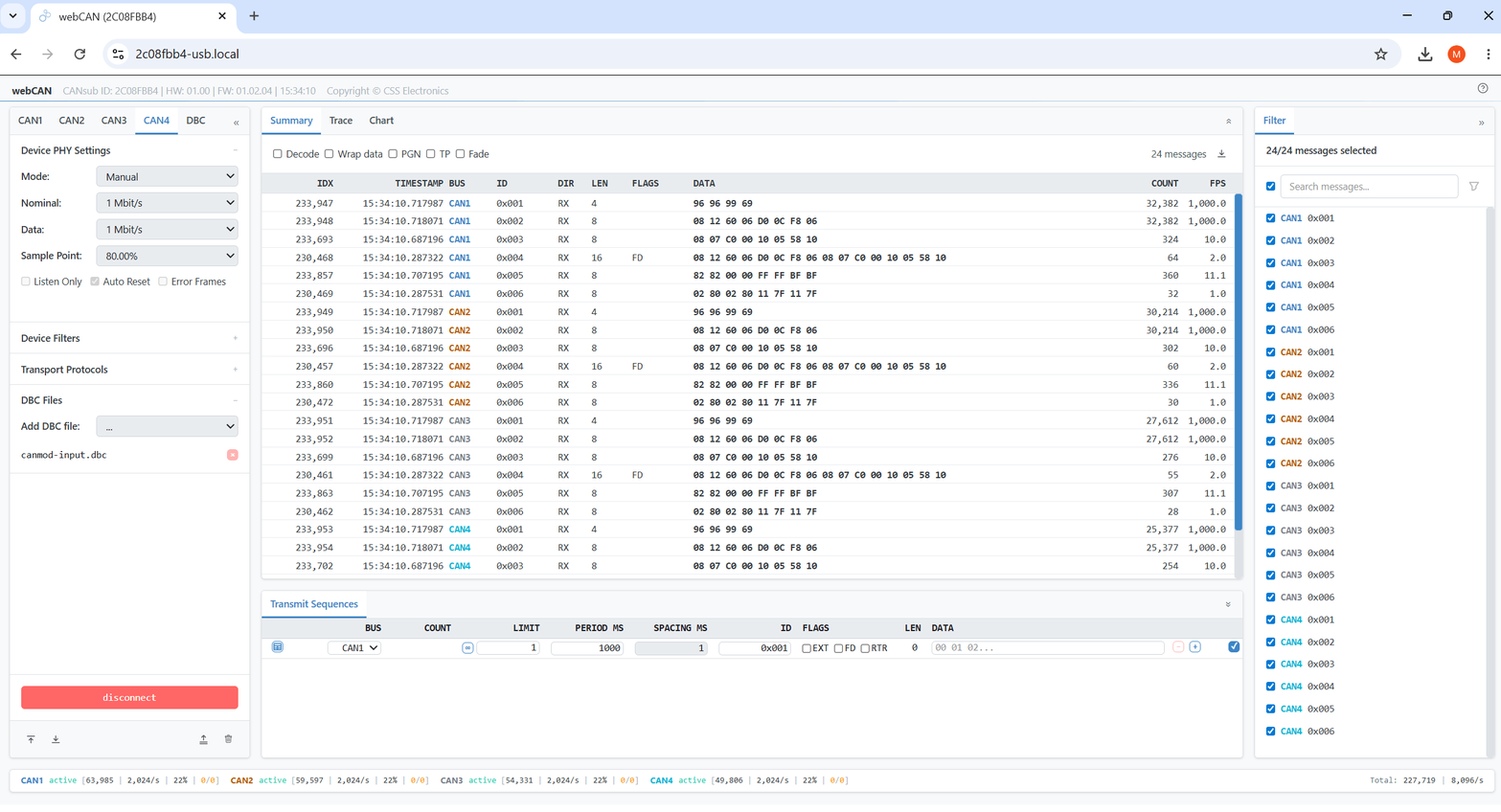 The Summary view displays key info per unique CAN frame (last data, frames/second, count) or by DBC decoded CAN signal (last/min/max/avg value) across all CAN channels in parallel
 With the Trace view you can see the latest CAN frames (or decoded signals) across CAN channels in real-time or browse/filter through up to 2M historical frames
 You can easily upload DBC files in webCAN and assign them per CAN channel to enable live decoding - with DBC files/assignments persisting across sessions
 Export raw/decoded CAN summary/trace data from webCAN to CSV for offline analysis in e.g. Excel or for later re-import into webCAN
 Deploy custom CAN transmit sequences/jobs with edge-based timing precision - ideal for OBD2, UDS, J1939 and XCP requests
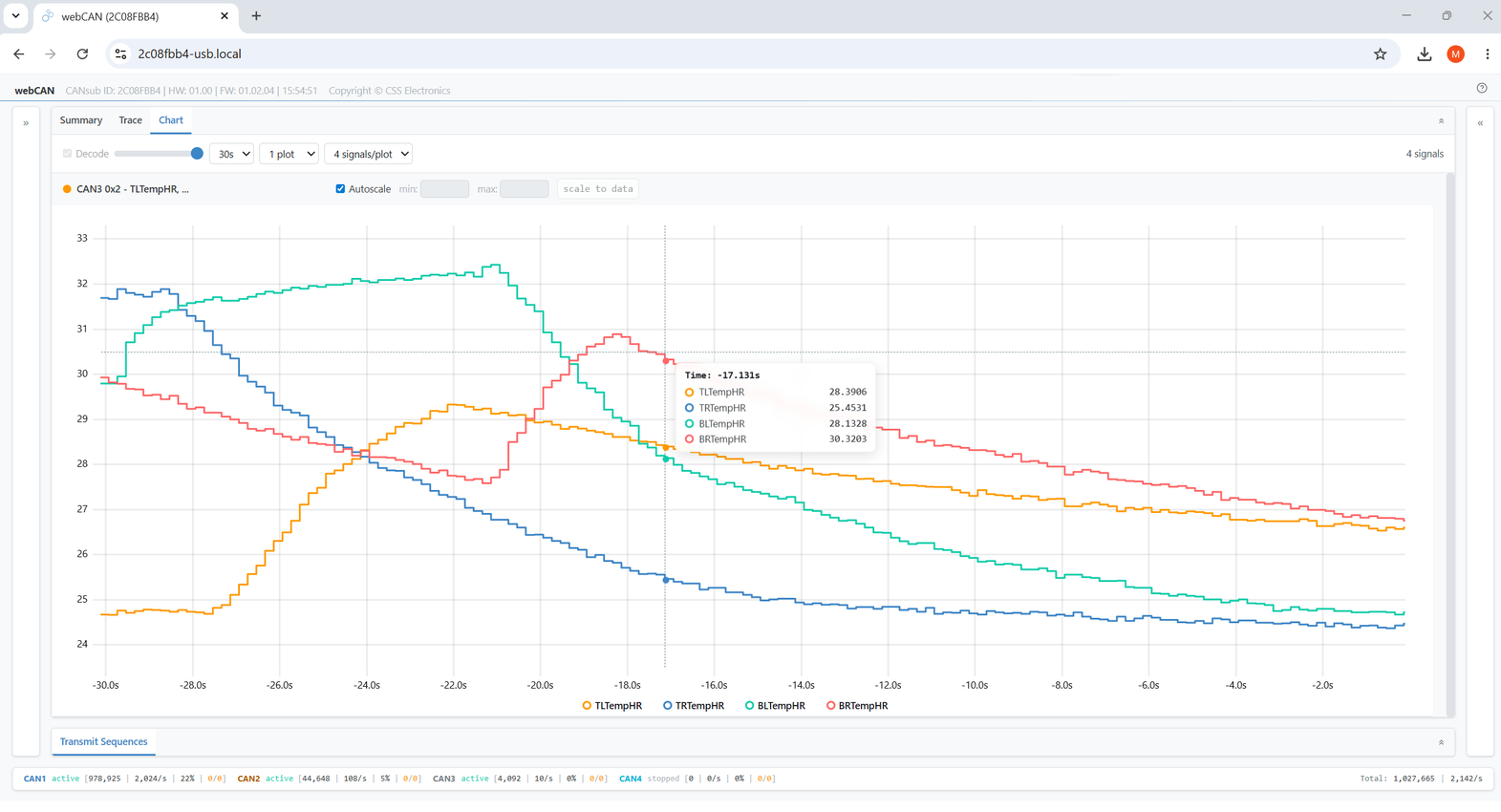 Use keyboard shortcuts to enter fullscreen mode in webCAN - ideal for focusing on real-time CAN signal plots on monitors and shared displays
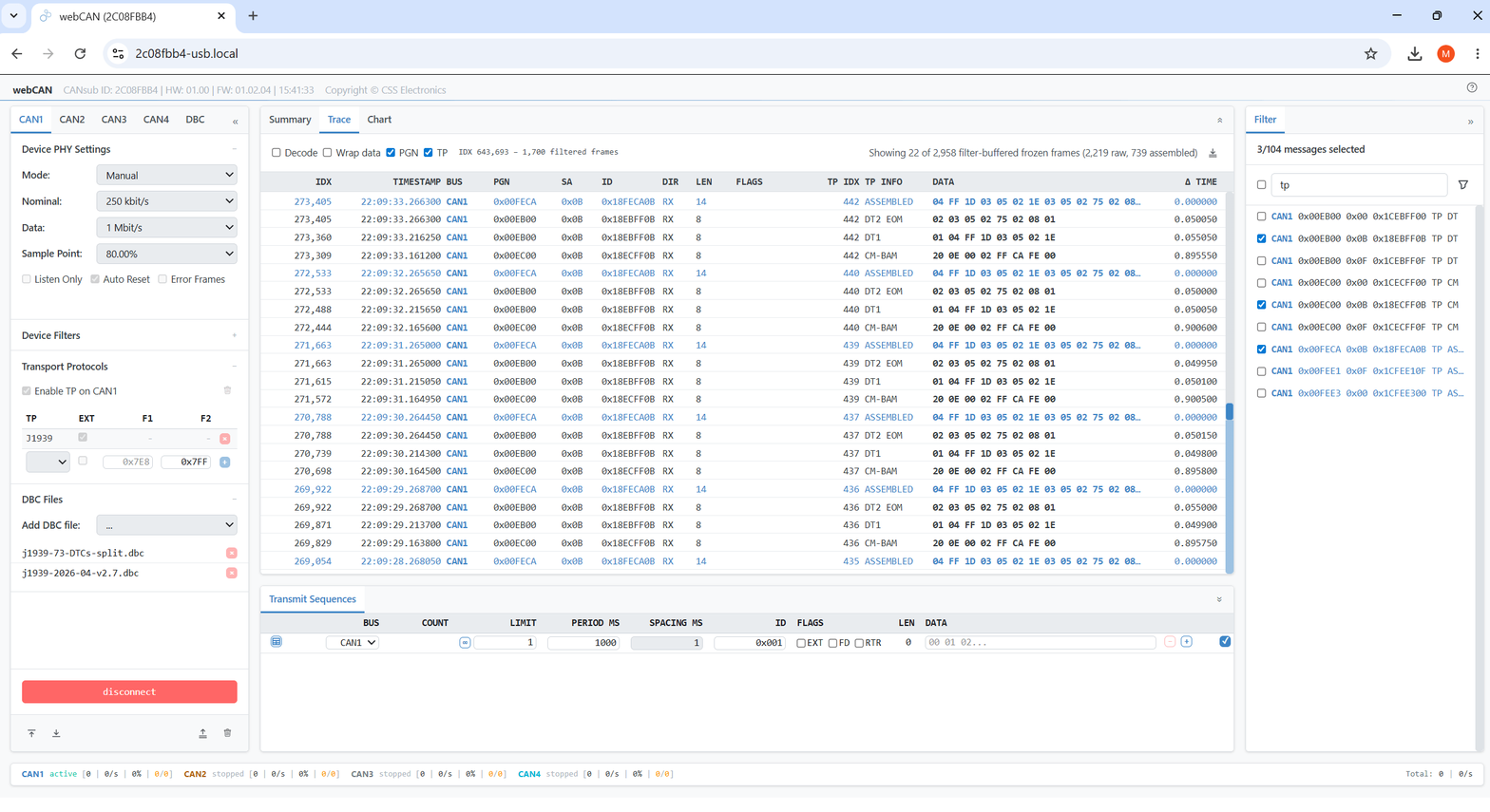 webCAN tags and decodes multi-frame transport protocol payloads incl. ISO-TP, J1939 TP and NMEA 2000 Fast Packets - critical for J1939 DM1/ OBD2 DTCs
Securely access your CAN data from anywhere via Ethernet
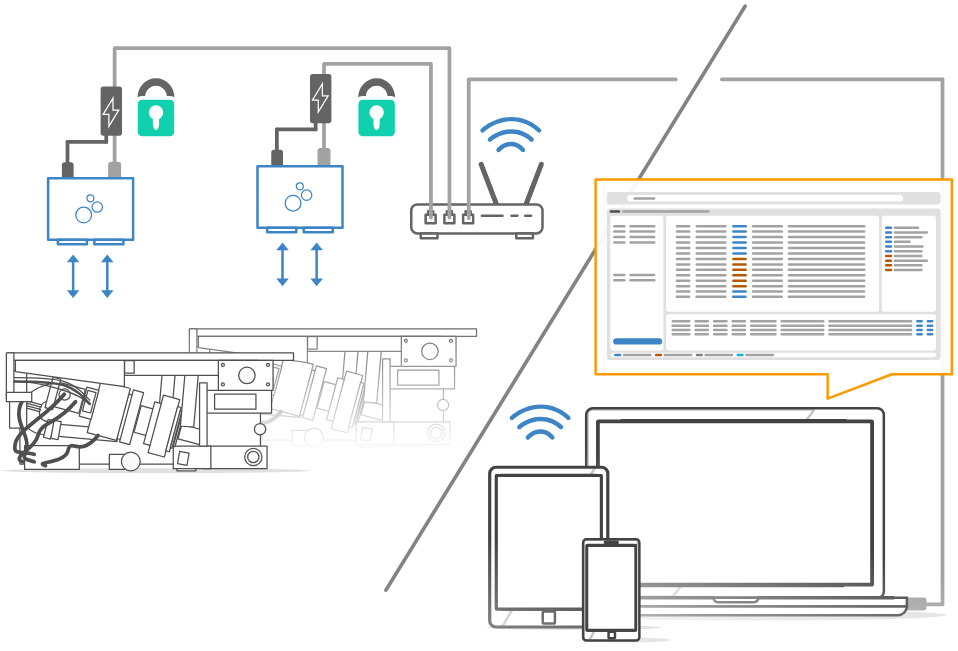
Connect the CSS CANsub via Ethernet to a router - then securely access it via LAN, WiFi or even the internet:
- Use the CSS CANsub from any device on the network
- CSS webCAN enables instant access via any PC/tablet/phone
- Connect the device to a WiFi router for wireless access
- Access multiple devices with unique bookmarked URLs
- All data securely encrypted via HTTPS (TLS)
- Optional access control via mTLS (TLS Mutual Authentication)
- Secure remote internet access via VPN - incl. via LTE routers
- Optional Power-over-Ethernet (PoE) adapter available
100% open CAN interface with free software and APIs
CSS CANsub provides an open REST/WebSocket API for custom apps & integrations - and a powerful toolbox beyond CSS webCAN:
- python-can: Build custom Python scripts/tools - or use the CSS CANsub as a drop-in replacement in your existing integrations
- SavvyCAN: Stream raw/decoded data - e.g. for CAN sniffing
- PlotJuggler: Plot CAN signals with advanced transformations
- REST API: For device configuration and monitoring (OpenAPI)
- WebSocket API: For real-time transfer of raw CAN frames
- JS/TS libraries: Quickly build custom CSS CANsub web apps
- Docs for All: LLM-friendly TXT docs for rapid development
Technical Specifications
| GENERAL | |
|---|---|
| Functionality | CAN-USB/Ethernet interface with 4 x CAN channels (incl. CAN FD) |
| Firmware | Supports free firmware updates for adding features |
| Software/APIs | Free CSS webCAN app (runs on device) - enter URL shown on device LCD display to start (zero installation) |
| CSS webCAN lets you configure device, send/receive CAN frames, DBC decode data, plot CAN signals and more | |
| Free open source python-can support for custom CAN scripts/tools/integrations | |
| Free open source SavvyCAN GUI for streaming of raw / DBC decoded data | |
| Free open source PlotJuggler GUI for plotting CAN signals with advanced transformations | |
| Open REST API (described via OpenAPI) for easy device management via software/API tools | |
| Open WebSocket API for streaming raw CAN frames for easy integration, incl. for pure web applications | |
| JS/TS libraries for building custom CSS CANsub web apps | |
| Safety | CE, FCC, IC and RoHS certified |
| Warranty | 1-year warranty |
| Support | Free, fast & high quality support |
| Support period | Security updates & vulnerability handling for min. 5 years from purchase (EU CRA) |
| Origin | Denmark |
| INTERFACES/SECURITY | |
|---|---|
| Interfaces | Configure device and stream CAN data via USB or Ethernet |
| USB | USB is ideal for simple desk setups or e.g. ad hoc in-field vehicle diagnostics |
| Ethernet | Ethernet enables flexible deployments (at scale, remote areas, wireless via WiFi/LTE routers, ...) |
| HTTPS (TLS) | The device uses TLS 1.2 to encrypt all data communication |
| Access Control (mTLS) | The device supports optional user authentication using TLS Mutual Authentication (mTLS) |
| Discovery | CSS CANsub supports mDNS to enable easy discovery of connected devices on your local network |
| CAN BUS | |
|---|---|
| Channels | 4 x CAN FD channels (Controller Area Network) |
| Isolation | Basic galvanic isolation (easily connect CAN buses not subject to high voltage differences) |
| Standard | ISO 11898: Compliant with CAN (between 5K and 1 Mbit/s baud rates) and CAN FD (1M, 2M, 4M, 5M) |
| Protocols | Receive/transmit data from/to CAN based protocols (J1939, CANopen, NMEA 2000, OBD2, UDS, CCP/XCP, ...) |
| Identifiers | Compliant with CAN specifications 2.0A (11-Bit ID) and 2.0B (29-Bit ID) |
| Bit-Rate | Bit rate can be auto-detected or set manually (incl. custom bit timing and sample point) |
| Transceiver Protection | Short-circuit, bus-fault and undervoltage protection |
| Ideal passive behavior when unpowered (high impedance / no load) | |
| TXD dominant timeout prevents network blocking on transceiver failure |
| DATA STREAMING | |
|---|---|
| Parallel CAN | Send/receive data from up to 4 x CAN channels simultaneously |
| Timestamping (RTC) | The device timestamps all RX/TX frames at 1 µs edge-based resolution (incl. in webCAN, python-can, ...) |
| Frames/Second | 20,000+ frames/second across the CAN channels (i.e. in practice any CAN busload) |
| Silent Mode | Configurable hardware-based silent mode |
| Filters | Multiple regular/extended hardware ID filters per channel |
| Transmit | Transmit custom CAN frames - e.g. for OBD2/UDS/XCP/J1939 requests, ECU flashing, tuning, commands, ... |
| Transmit sequences can be deployed as 'device jobs' for 10 µs edge-based inter-message timing precision | |
| CAN Error Frames | Support for logging CAN error frames (bit-stuffing, form, CRC, bit, acknowledgement) |
| Remote Frames (RTR) | Support for logging/transmission of remote CAN frames (RTR) |
| Unique Device ID | Each device has a globally unique ID |
| DISPLAY | |
|---|---|
| Type | Built-in colorized TFT LCD display (160 x 80 px) |
| Boot State | Shows device URL/IP for connecting via software/API tools (e.g. webCAN directly in your browser) |
| Connected State | Shows CAN channel status (CAN1-CAN4), bit-rates, errors, busloads, frames/second |
| ELECTRICAL | |
|---|---|
| Input Supply | +5V via USB connector (optional Power-over-Ethernet adapter available) |
| Power Consumption | Extremely low (<1 W) |
| MECHANICAL | |
|---|---|
| Enclosure & Weight | Compact aluminium enclosure: 75 x 67 x 20 mm (W x L x H excl. flanges). 90 grams |
| Connector (Front) | 1 x D-sub 25 (DB25) connector (optional DB25-4xDB9 adapter cable available) |
| USB | USB-C interface for power (+5V DC), data streaming and firmware update (use our USB-C cable) |
| Ethernet | RJ45 Ethernet interface for data streaming and configuration/firmware update |
| Pin-Out | See the product manual for connector pin-outs |
| Flanges | Flanges with 4 x M3 screw holes (head diameter < 6 mm) |
| Temperature | Operating temperature (parts): -25degC to +70degC |
| IP Rating | IP40 |
| Mounting | Device can be mounted via e.g. velcro strips or mounting kit |